Generating diagrams for unfamiliar codebases using an AI skill


Everyone who has worked in software has experience poring over multiple codebases trying to understand how all the different pieces of functionality interact.
One of my first starter tasks when I joined Sentry was to learn more about the Celery integration for Sentry's Python SDK and, more specifically, the internals of how Celery and its messaging library, Kombu worked. I needed to better understand what information was available at different points of time in the code path.
I'm a visual learner, so diagrams are very helpful for me to digest and understand the system as a whole. The problem is, diagrams like these are time-consuming to create, sometimes taking hours to piece together.
However, just as I was mentally preparing myself to start building these diagrams, I learned that Sentry was about to kick off a multi-day AI "codeathon" as a way of exploring and sharing uses of AI across the company.
So I thought building a Claude Skill for this would be a good project for this codeathon. If it worked, I had a new tool that was going to save me hours of time in terms of my onboarding and if it didn't, it was going to be a great experiment!
Tools used in the creation of the skill
- Claude Code, using mainly the Sonnet and Opus models.
- Sentry's skill-writer AI skill
- The unofficial Excalidraw MCP
- You could likely use Figma/Figjam for this as well
What the skill contained
I tried my best to keep the skill lightweight and flexible. The skill included instructions to ask the user for what they were specifically interested in learning, the level of depth that they wanted to go into for the diagram, and any particular entry or exit points that they were interested in seeing the code path for.
The skill also contained a couple of guards in order to make it easy for anyone to get up and running with the skill relatively quickly. These included:
- Initial checks that the Github and Excalidraw MCPs were installed to ensure that if I shared this skill with someone, it didn't attempt to try and generate a diagram when it didn't have the right tooling; and
- Explicit instructions to not clone the git repositories of the projects I was exploring.
- The AI kept trying to do this for some reason, so I instead gave it instructions to get information using the Github MCP tool, Github CLI, or, if it genuinely needed to make a web request, to only make requests to
github.comorraw.githubusercontent.com.
- The AI kept trying to do this for some reason, so I instead gave it instructions to get information using the Github MCP tool, Github CLI, or, if it genuinely needed to make a web request, to only make requests to
The results
I got a couple of pretty decent diagrams out of it!
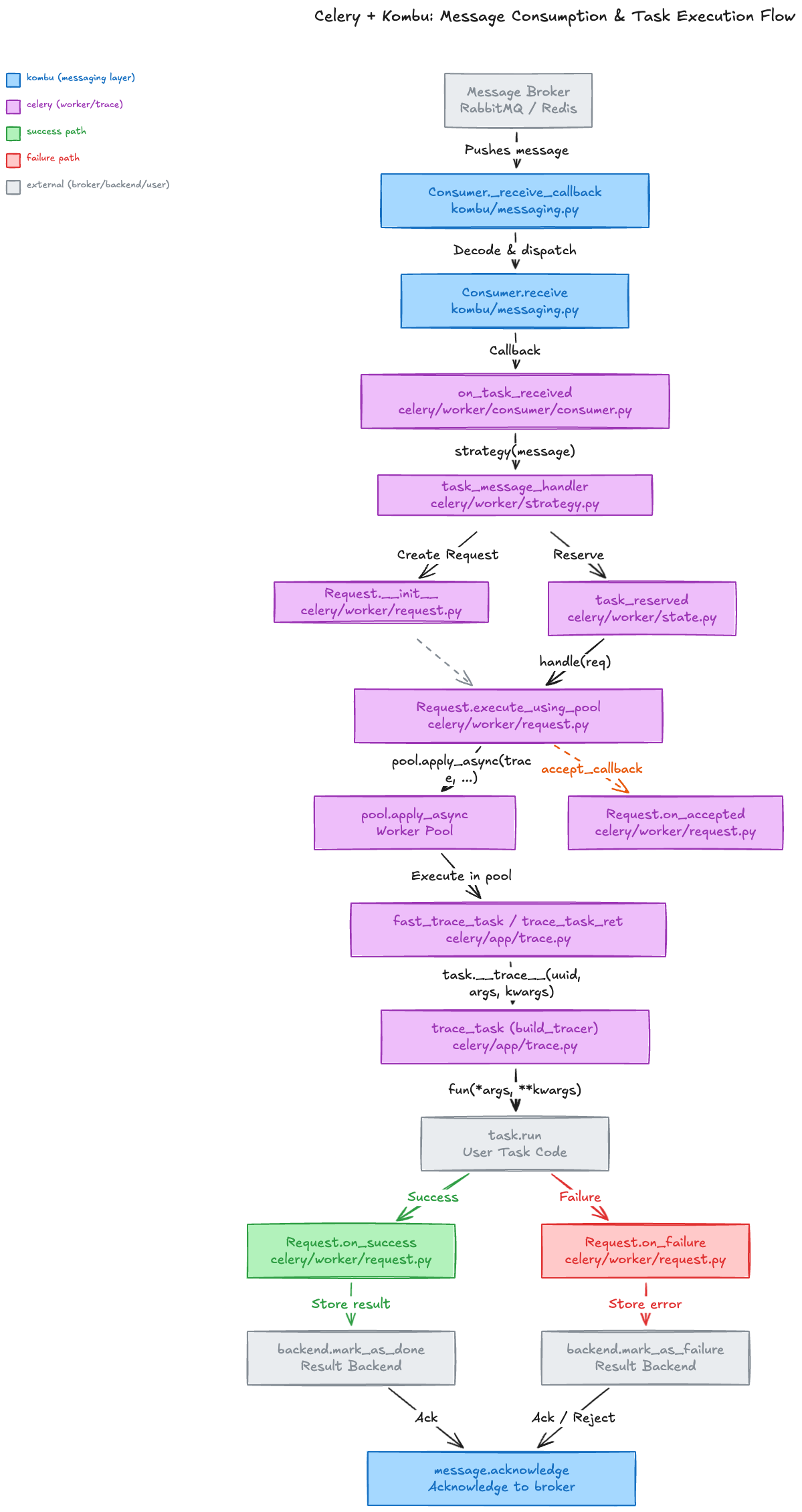
I had prompted it to focus primarily on the functionality from the point at which a task was consumed from the message broker to the point where the task was acknowledged as a success or failure.
The first iteration of the skill where everything took place in a single context gave me a high-level overview in a visually clean diagram, while the second iteration that involved the use of subagents and handover artifacts (like a markdown file containing the research results of searching through the Celery and Kombu codebases) resulted in a much more detailed, though not as visually clean, diagram.
Below is the result of the first iteration which turned out to be the better of the two diagrams:
Lessons learned
Claude continues to be spectacularly bad with numbers
As part of the prompt, I had asked Claude to provide file line numbers to the specific function or method definition in the flow chart diagram.
It got every single one wrong. Not even a little off by a line or two, but off by dozens if not hundreds of lines - it looks like it made them up.
However, asking for classes, function names, and file paths to use in the diagram - Claude got this right.
Subagents are useful for managing context
One of the educational sessions from the codeathon that I took part in covered how to leverage context more effectively to get better results with the AI, and where subagents fit into that.
Because subagents have their own isolated context window, you can do multiple steps in a workflow without overloading the context of the main (or parent) session.
The first iteration of the skill that did a workflow entirely within a single context window was pretty great as you can see from the image above, but when I updated it to delegate various tasks to subagents, the amount of detail I got in the diagram grew significantly.
Wrapping up
If I were to give one piece of advice for others from this experience - use a higher-end model like Opus and use a structured skill writer like the one Sentry has published on GitHub when creating an AI skill.
That combination made my skill significantly more reliable - my first attempt in creating the code diagram skill with Sonnet and without the skill writer was noticeably less detailed and harder to follow.
Like what you've read?
Subscribe to receive the latest updates in your inbox.